How to put a calendar on your Mac desktop, Google Calendar included
There are three good ways to keep a calendar on your Mac desktop, and you may already have everything you need. macOS can show your calendar as a desktop widget, your Google or Outlook calendar can feed into it, and Google Calendar can even get its own app window. This guide covers all three on macOS 27, then shows what a full-desktop calendar adds.
We checked the menus and settings below on macOS 27.0.1, in Calendar, Safari and System Settings.
Put Apple’s Calendar widget on the desktop
- Control-click (or right-click) the wallpaper and choose Edit Widgets….
- Search for Calendar. It offers several widgets:
- Up Next: your next event, so you always know what’s coming.
- List: a compact list of your upcoming events.
- Month: the current month at a glance.
- Date: today’s date on its own.
- Drag the one you want onto the desktop, or click it to place it. Click Done.
To resize it, Control-click the widget and choose a size; to remove it, choose Remove Widget. Our guide to adding widgets to your Mac desktop covers the details, including how to stop widgets turning gray when windows are in front.
Get Google Calendar or Outlook onto your desktop
Calendar’s widgets show every calendar the Calendar app knows about. So the way to get Google Calendar (or Outlook, or Yahoo) onto your desktop is to add the account to your Mac once:
- Open System Settings > Internet Accounts, then click Add Account…. (In the Calendar app, Calendar > Add Account… gets you to the same place.)
- Choose Google and sign in to your Google account.
- Make sure Calendars is turned on for that account.
Your Google calendars then appear in the Calendar app’s sidebar and in the Calendar widgets. Events you add on the Mac go back to Google, and the other way round.
For Outlook: Microsoft 365, Outlook.com and most work accounts are added the same way, usually as Microsoft Exchange. If your company uses something else, ask your IT team which account type to choose.
Just want to see a public calendar, like holidays or a sports schedule? In Calendar, choose File > New Calendar Subscription… and paste its address.
Give Google Calendar its own app window
Google doesn’t make a Mac app for Google Calendar, but Safari can turn the website into one:
- Open calendar.google.com in Safari and sign in.
- Choose File > Add to Dock… and confirm.
Google Calendar now opens in its own window, with its own Dock icon, separate from your browser tabs. Chrome can do the same from its menu. This keeps Google’s full interface (event colors, Meet links, appointment schedules) at the cost of being a window, not something on the desktop.
Which one to use
| You want | Use |
|---|---|
| Your next event always in view | The Up Next widget |
| Google or Outlook events on the desktop | Add the account in Internet Accounts, then a Calendar widget |
| Google Calendar’s own features in a window | Safari’s Add to Dock… |
| The whole month on the desktop, at a size you can read and type into | A desktop calendar app, below |
What the built-in options can’t do
Widgets are made for a glance. Even the Month widget is a small grid, and none of them let you type: clicking a widget opens the Calendar app. They also sit under your windows and dim while windows are in front. The Google web app, on the other hand, is a full window you switch to, not a calendar that’s simply there when you look at your desktop.
A calendar that is your desktop
If you want the desktop itself to be your calendar, the way a paper desk calendar is, that’s what our app Desktide does.

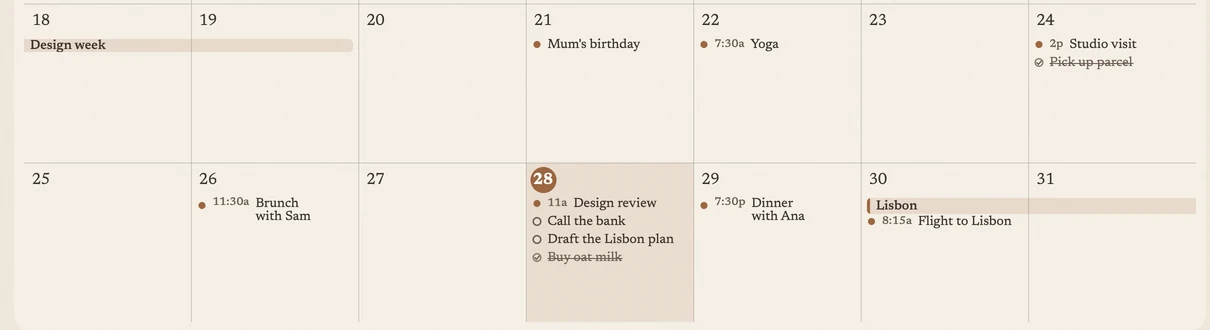
- The whole month, full size. The Month layout draws your month across the entire desktop, under your icons, which keep working. Events that span several days run as one bar; a busy day shows +N more; the arrows in the header browse other months.
- Type straight onto it. Double-click a day and type. With a time (“Dentist 10:00”, “Gym at 7pm”) it becomes an event; without one, a reminder on that day. Name a day (“tomorrow”, “Friday”) and it lands there.
- Your real calendars, two-way. It isn’t a separate calendar: it reads and writes Apple Calendar and Reminders. So everything you added above, including Google and Outlook calendars, shows on your desktop, and what you add on the desktop reaches your iPhone.
- Other views. A Today + week layout shows today’s list with the week below it, and a Wallpaper layout keeps just the date and your next event over your theme. A Today widget and a menu bar popover cover the times your desktop is hidden.
Desktide asks for Calendar and Reminders access the first time you connect them, never at launch, and works without it for notes and zones. It’s coming soon to the Mac App Store; see what it does.
Troubleshooting
- My Google calendar doesn’t show in the widget. Open the Calendar app and check that the Google account appears in the sidebar with its calendars ticked. If it doesn’t, check Internet Accounts: Calendars must be on for that account.
- Events I add in Google don’t appear right away. The Mac fetches changes from Google periodically. Open Calendar and choose View > Refresh Calendars to fetch now.
- The widget is gray. That’s widget dimming. Set Dim widgets on desktop to Never in System Settings > Desktop & Dock.
Questions
How do I keep a calendar on my Mac desktop?
Add a Calendar widget: Control-click the wallpaper, choose Edit Widgets…, search for Calendar and drag Up Next, List or Month onto the desktop.
Can I put Google Calendar on my Mac desktop?
Yes. Add your Google account in System Settings > Internet Accounts with Calendars turned on. Its calendars then show in the Calendar app and in Calendar's desktop widgets.
Is there a Google Calendar app for Mac?
Google doesn't make one. In Safari, open calendar.google.com and choose File > Add to Dock… to turn it into a web app with its own window and Dock icon.
Does Outlook calendar work on the Mac desktop too?
Yes, once the account is added to the Mac. Microsoft 365 and work accounts are usually added as Microsoft Exchange in Internet Accounts; then they appear in Calendar and its widgets.
Can I type events straight onto a desktop calendar?
Not with Apple's widgets: clicking one opens the Calendar app. A desktop calendar app such as Desktide lets you double-click a day on the desktop and type.