Apps · No. 02 · Uninstaller
Doff
Take an app off your Mac. All of it.

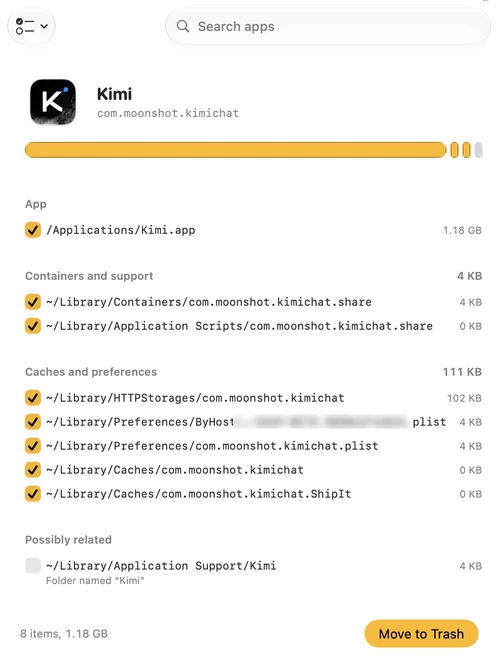
The Trash only takes the app.
Drag an app to the Trash and the app goes. Its caches, settings, containers and background helpers stay behind.
Doff shows how much an app really takes, and where the weight lives. Then it takes the rest off too.
What it does
Catches apps you trash.
Drag an app to the Trash and Doff asks once, quietly, whether its leftovers should go too.
Shows the real footprint.
See how much space an app really takes and where it lives: containers, caches, settings, logs and background items.
Finds what's left behind.
Leftovers of apps you deleted long ago, including launch daemons and helpers that can keep running as root after their app is gone.
Everything can come back.
Doff moves files to the Trash, never deletes them. History keeps every removal, with Put Back.
Careful by design.
Only confident matches are preselected. Shared data, iCloud Drive folders and anything from Apple are left alone.
Right from Finder.
Add the “Uninstall with Doff” Quick Action and remove an app straight from its right-click menu.
Price
Scanning shows every leftover and its size at no cost. Moving them to the Trash takes a one-time $12.99 license. No subscription, no telemetry.
Needs macOS 15 or later and Full Disk Access. Items outside your home folder, such as root helpers, are removed by a small helper you approve once in System Settings.Questions
Does Doff delete files permanently?
No. Doff moves the app and its leftovers to the Trash. History lists every removal, and Put Back returns the files to where they were.
What does Doff never touch?
Apple apps and system folders, your Documents, Desktop, Downloads, Pictures, Movies and Music folders, and your keychains. It refuses symbolic links, and data shared with another installed app or stored in iCloud Drive is never preselected.
Why does Doff need Full Disk Access?
macOS protects the Trash and several Library folders where apps keep data, such as Containers and Cookies. Without Full Disk Access, Doff cannot see those leftovers or notice when you drag an app to the Trash.
What is free and what needs a license?
Scanning is free: you can see every leftover and how much space it takes. Moving them to the Trash needs a one-time $12.99 license.
Does Doff collect data about me?
No. Doff has no analytics or telemetry. It only contacts Lemon Squeezy to activate and check your license, and qiffe.com to look for updates.
Related guides
- AppCleaner alternatives for Mac, and when you need oneChecked on macOS 27.0.1
- The best Mac menu bar apps in 2026, one for each jobChecked on macOS 27.0.1
- CleanMyMac alternatives: what macOS already does, and what fills the restChecked on macOS 27.0.1
- LaunchDaemons and privileged helpers on Mac: what they are and how to remove leftoversChecked on macOS 27.0.1
- macOS missing features: what's still not there, and what finally arrivedChecked on macOS 27.0.1
- Looking for a Pearcleaner alternative? What changed, and your optionsChecked on macOS 27.0.1
- How to completely uninstall apps on a Mac, leftovers includedChecked on macOS 27.0.1
- How to uninstall the ChatGPT app on Mac completelyChecked on macOS 27.0.1
- How to uninstall the Claude desktop app on Mac completelyChecked on macOS 27.0.1
- How to uninstall Google Chrome on Mac completely, updater includedChecked on macOS 27.0.1
- How to uninstall WhatsApp on Mac completelyChecked on macOS 27.0.1