Apps · No. 03 · Folder undo
Mulligan
Save a folder before anyone changes it. Put it back in seconds.

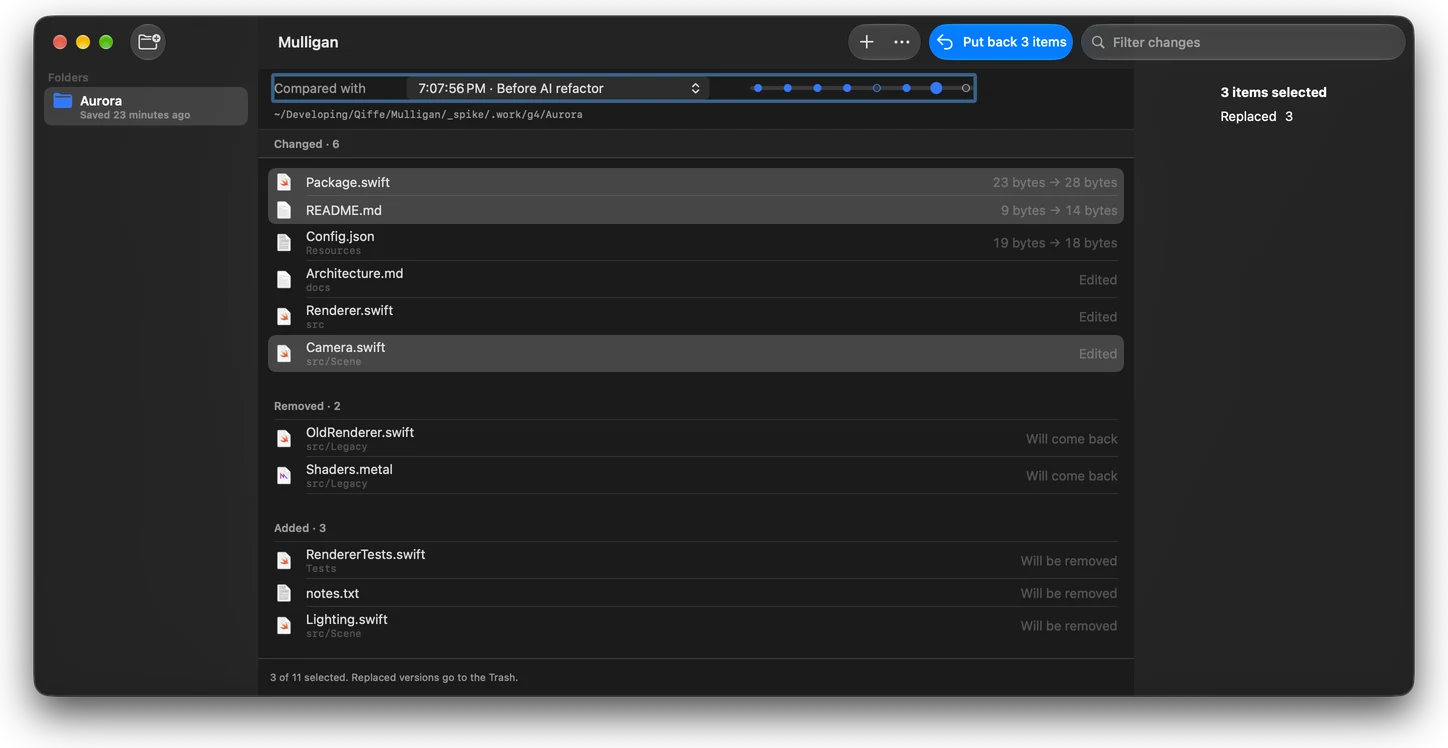
An undo point for one folder
Take a mulligan before an AI agent, a script or a big edit touches a folder. If it goes wrong, put back the whole folder, or just the files you pick.
Time Machine backs up the whole disk on its own schedule and git only tracks a repository. Nothing on the Mac saves one folder right now and puts it back exactly as it was. Claude Code’s own rewind, for example, doesn’t undo changes made by shell commands such as rm or mv, its documentation says. A mulligan covers every change, whoever made it.
How fast
Measured on macOS 27.0.1 on an APFS disk. Time grows with the number of files, not their size.
- 20,000 files and a 1 GB file
- Saved in 2.0 s, using about 8 MB of extra space
- A real Xcode project
- 6,522 files, 717 MB: saved in 2.0 s, put back in 2.1 s
- 200,000 files
- Saved in 21 s
- 1,000,000 files
- Saved in 107 s
What it does
Take a mulligan.
From the menu bar, from Finder with the “Take a Mulligan” Quick Action, or with
mulligan savein Terminal. Give it a name like “Before AI refactor” if you like.See what changed.
Every file that changed, was removed or was added since then. Pick any earlier mulligan to compare with.
Put back all of it, or some.
Select the files you want back, or put back the whole folder in one step. Replaced versions go to the Trash.
Almost no disk space.
APFS clones share data with the original until a file changes, so saving a 1 GB folder costs megabytes, not gigabytes.
Made for agents and scripts.
The command line tool has
save,list,diffandrestore, so a script or an agent can take a mulligan before it starts.Out of the way.
Saved moments are left out of Time Machine and Spotlight, and old ones are cleared by the limits you set.
Price
Two mulligans are free, and putting back is always free. A one-time $9.99 license unlocks unlimited mulligans and mulligan save on the command line.
Questions
Is Mulligan a backup?
No. Mulligans live on the same disk as the folder, so if the disk fails they go with it. Keep Time Machine or another backup for that. Mulligan is an undo point for one folder, right now.
How can it save a large folder in seconds without filling my disk?
It uses APFS clones: the saved copy shares its data with the original until a file changes. Time grows with the number of files, not their size.
Which disks does it work on?
APFS disks: your Mac’s own disk and APFS-formatted external drives. It refuses disks it can’t clone on, such as exFAT, before it writes anything.
What happens to the files I replace?
They go to the Trash. Putting back a whole folder first takes a mulligan of its current state, so you can undo the undo.
What is free?
Two saved mulligans per Mac, and putting back is always free. A one-time $9.99 license unlocks unlimited mulligans and mulligan save on the command line.
How much space do old mulligans take?
Mulligan keeps the newest 5 per folder and stays under 10 GiB in total by default; you can change both in Settings. The saved moments are left out of Time Machine and Spotlight.
Related guides
- Claude Code deleted my files: how to get them back on a MacChecked on macOS 27.0.1
- How to clone a folder on a Mac without using extra disk spaceChecked on macOS 27.0.1
- How to restore a folder to a previous version on MacChecked on macOS 27.0.1
- Time Machine or a folder snapshot: which should you use to undo a change?Checked on macOS 27.0.1
- How to undo Claude Code changes, including the ones /rewind can'tChecked on macOS 27.0.1